
System Settings Reliable School Management System
- In the Admin panel click on Edit button to update your school data under System Settings > General Setting in upper right side .
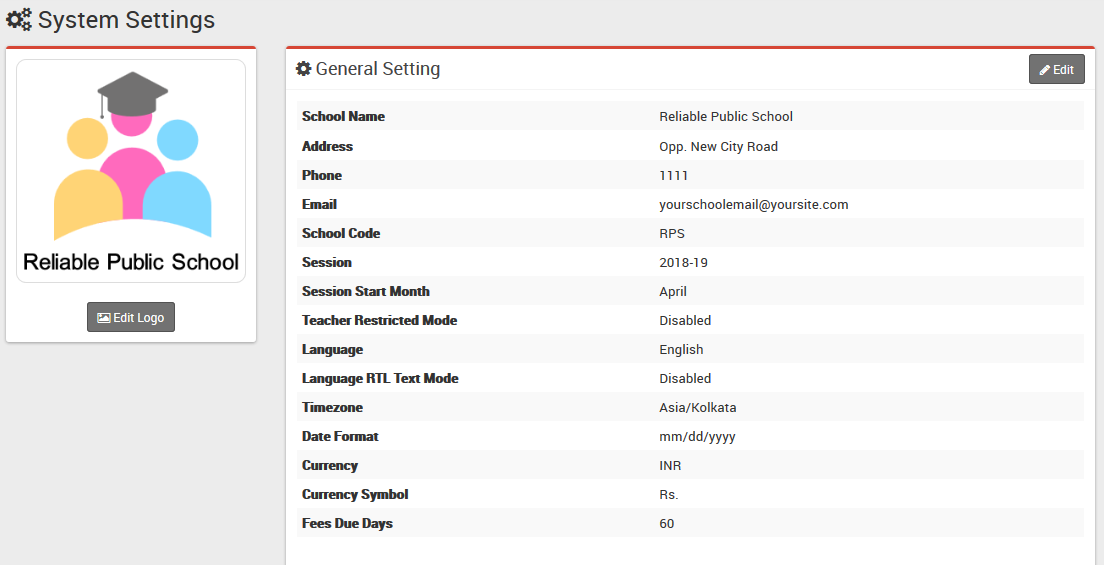
- Update detail like School Name, Address, Phone, Email, School Code (Your school affiliation / accreditation no), Session (current running Academic Session for the school), Session Start Month, Teacher Restricted Mode, Language , Language RTL Text Mode (applied only to Arabian side languages), Timezone, Date Format, Currency (ISO standard 3 digit currency code), Currency Symbol and Fees Due Days (used in Fees Carry Forward) now click on Save button to update record.
- For updating logo click on Edit Logo button,choose your school logo file (it is recommended for logo to use .png image with transparent or white background and around 200px x 200px in size) now click on Edit button to update logo image.
- For automated SMS messaging add any one of available SMS Gateway with the required details from System Settings > SMS Setting.
- To enabling online payment in Parent Panel and Student Panel update your payment gateway account details for this, go to System Settings > Payment Methods select your appropriate payment gateway and add you payment gateway account details then click on save button and enable it from right side box.
- At this point we have completed basic setup of our school. Now we will add our academics in Smart School like Classes, Sections, Subjects, Teachers.
Note: In Teacher Restricted Mode teachers can see only their allotted class student data as Class Teacher or as Subject Teacher)